http://ririanproject.com/2006/10/30/how-to-keep-good-posture-when-in-front-of-a-computer/
“We spend a large portion of our lives sitting, especially during the computer age, so it’s important to learn to sit tall. One of the most common mistakes we make is that when we move into a sitting position, we tend to aim for the center of the chair. The proper method is to sit deep in your chair.”
- Dr. Marvin Arnsdorff
Today we are spending more time at computers, an activity through which people’s bad posture can affect their overall health.
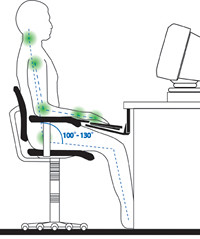 Posture ranks at the top of the list when talking about good health. It is as important as eating right, exercising, getting a good night’s sleep and avoiding harmful substances. Unnatural alignment of the body can cause head, shoulder, neck and back pain, and compromise neurological, digestive, respiratory and cardiovascular functioning.
Unquestionably, students and adults alike spend more time at computers today than 20 years ago. So here are nine tips designed to help people’s posture when they’re at the computer at home, school or work:
1. Support Your Back
Does the chair you are sitting on have enough lumbar support? The backrest should fit into the natural curve of your lower back, filling in the space between your back and the back of the chair. This helps avoid excess pressure on the spine and makes it easier to maintain good sitting posture.
Adequate lumbar support also helps prevent muscle fatigue, which causes many people to lean their heads and upper backs too far forward or to slouch downward. With good lower back support, spinal muscles are relaxed and the spine is able to maintain its neutral position.
2. Comfortable Leg Postures
To promote comfortable leg postures, consider clearing away items from your legs to allow comfortable leg positions and movement. Feet should be flat on the floor or you may use a footrest if your feet do not rest comfortably.
3. Minimize Reaching
Position work station components to minimize reaching and twisting. Keep frequently accessed objects as close as possible to body centre.
4. Comfortable Shoulder and Arm Postures
Place your keyboard and mouse or trackball at the same height; these should be at about elbow level. Your upper arms should fall relaxed at your sides.
Also when typing, center your keyboard in front of you with your mouse or trackball located close to it.
5. Wrist and Finger Postures
Keep your wrists straight while typing and while using a mouse or trackball. Avoid bending your wrists up, down, or to the sides. Use the keyboard legs if they help you maintain a comfortable and straight wrist position. Type with your hands and wrists floating above the keyboard, so that you can use your whole arm to reach for distant keys instead of stretching your fingers.
Make sure you keep your fingers relaxed while typing and using a mouse. Use a soft touch on the keyboard instead of pounding keys with unnecessary force.
Also grasp the mouse gently and avoid holding a pen or anything else in your hands while you type or use the mouse. You should relax your fingers and hands between bursts of typing or mousing using a flat, straight wrist posture.
When moving your mouse, you may be more comfortable if you use your arm, not just your wrist. Choose a mouse that fits the size of your hand comfortably and is as flat as possible to minimize wrist strain.
6. Minimize Neck Bending and Twisting
Center your monitor in front of you. Consider placing your documents directly in front of you and the monitor slightly to the side, if you refer to your documents more frequently than your monitor.
Sit comfortably in the chair. Close both eyes and relax. Then, slowly reopen them. Where the gaze initially focuses should be when the eyes open is the place to put the center of the computer screen. The screen can be raised using books or a stand if needed.
7. Minimize Eyestrain
Place your monitor at a distance of about arm’s length when seated comfortably in front of the monitor. Also avoid glare. Place your monitor away from light sources that produce glare, or use window blinds to control light levels. Don’t forget to adjust your monitor brightness, contrast, and font size to levels that are comfortable for you.
Throughout the day, give your eyes a break by forcing them to focus on something other than on your screen. Try the following exercise: Hold a finger a few inches in front of your face; focus on the finger as you slowly move it away; focus on something far in the distance and then back to the finger; slowly bring the finger back toward your face. Next, shift your focus to something farther than eight feet away and hold your eyes there for a few seconds. Repeat this exercise three times, several times a day.
8. Take Short Breaks
Taking breaks can help your body recover from any activity. The length and frequency of breaks that are right for you depend on the type of work you are doing. Stopping the activity and relaxing is one way to take a break, but there are other ways, also. For example, just changing tasks - perhaps from sitting while typing to standing while talking on the phone can help some muscles relax while others remain productive.
9. Periodically Look Up At the Ceiling to Give Your Posture Muscles a Break
So, improve your sitting posture and remember, a healthy lifestyle can help you perform and enjoy your everyday activities, including the time spent at your computer. Learning more about working comfortably and productively, as well as your overall health, are important ways to help you enjoy your computing experience.
